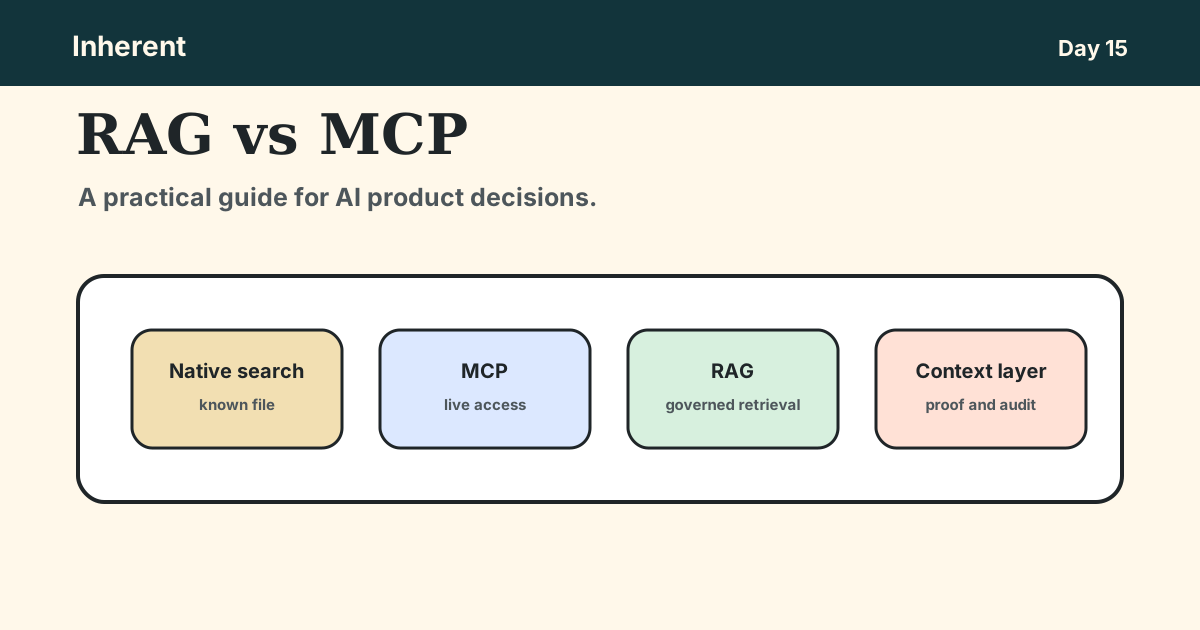
By the end, you should be able to decide whether an AI workflow needs native search, MCP, RAG, or a layered system.
- What RAG and MCP do in plain English.
- Why Google Drive and Confluence search are not the same as governed retrieval or RAG systems.
- When MCP is the right layer for live access and actions.
- When RAG is the right layer for messy company knowledge.
- Why most serious AI agents combine both patterns.
- A retrieval choice map you can use today.
The real comparison is access vs retrieval
RAG and MCP are often compared because both help AI systems use external context. But they solve different problems.
The Model Context Protocol documentation describes MCP servers as programs that expose capabilities to AI applications. Those capabilities include tools a model can call, resources that provide read-only context, and prompts that package repeatable workflows.
Retrieval augmented generation is different. AWS Prescriptive Guidance describes RAG as a pattern where a system ingests content, retrieves relevant context for a query, adds that context to the prompt, and generates a grounded answer. Microsoft Azure AI Search frames RAG around grounding model responses in proprietary content through retrieval and governance.
Technical explanation
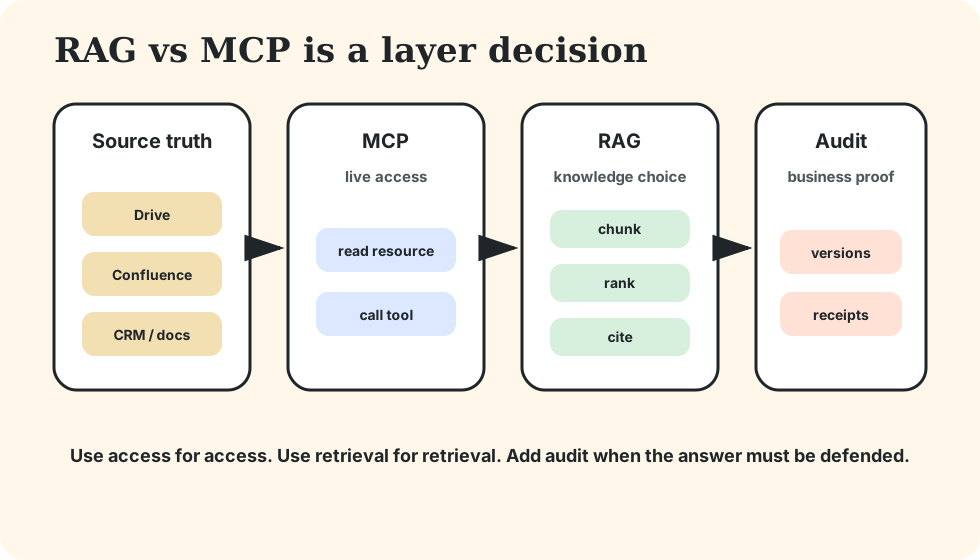
MCP is an interface. It lets an AI client connect to file systems, APIs, databases, SaaS tools, and internal services through standardized resources and tools.
RAG is a retrieval architecture. It usually parses documents, chunks content, embeds or indexes passages, retrieves relevant context, applies filters, and passes selected evidence to the model.
Business explanation
Think about the workflow.
If an assistant needs to read one Confluence page and create a Jira issue, MCP is the natural layer. If an assistant needs to answer a policy question across a messy collection of pages, PDFs, and old support runbooks, RAG is the natural layer.
If the assistant needs to answer the policy question and then update the customer ticket, you probably need both.
The implication is straightforward: MCP is how the agent reaches systems. RAG is how the agent chooses the right knowledge.
Native search is enough when the user wants a file, not an answer
Do not build RAG when the work is simple lookup.
Google Drive already supports file and folder search. The Google Drive API documentation describes using the files.list method with query strings to search files and folders, retrieve file IDs, and filter by fields, labels, or corpora. Confluence has its own search model around pages, spaces, and project knowledge.
Use native search when:
- the user knows the file or page they want,
- the expected output is a document, not a synthesized recommendation,
- the search happens inside one source system,
- the human will inspect the result, and
- permissions are already handled by the source system.
Example: "Find the Q3 launch plan in Google Drive."
That is not a RAG problem. It is file search.
Native search breaks down when the question becomes: "What should we tell this customer based on the latest policy, their contract, and the escalation history?"
That workflow requires the system to choose evidence, resolve conflicts, and produce a defensible answer.
MCP is enough when the agent needs live access to a known system
MCP is the right answer when an agent needs to read from or act inside a known system.
Atlassian's Rovo MCP Server docs describe a cloud bridge that lets compatible tools interact with Jira, Compass, and Confluence data in real time through OAuth authorization. The docs also describe practical workflows such as summarizing and searching Confluence content, creating or updating issues or pages, generating tickets from notes, and respecting the user's existing access controls.
That is where MCP shines.
Use MCP when:
- the target system is known,
- the agent needs live data,
- the task may involve a write action,
- the source system's permissions are the right boundary,
- the user can approve meaningful actions, and
- the result depends more on current state than broad knowledge retrieval.
Example: "Summarize this Confluence planning page and create five Jira stories."
MCP is the natural fit because the assistant needs authorized access and a write path.
The risk is assuming that system access equals answer quality. It does not. An MCP connector can fetch from a system, but it does not automatically create a reliable retrieval layer across Drive, Confluence, Slack exports, PDFs, runbooks, and product docs.
RAG is needed when the hard part is choosing the right knowledge
RAG is the right answer when an agent must find, rank, and cite the right pieces of company knowledge.
Use RAG when:
- the content set is large,
- the user does not know which document contains the answer,
- keyword search misses the meaning of the question,
- multiple sources may conflict,
- stale documents can cause harm,
- citations matter,
- retrieval quality must be tested, and
- the team needs to reproduce why the answer was generated.
Example: "Can we refund this customer under the current policy?"
A good answer may need the approved policy, region-specific terms, a product exception, the customer's billing state, and the support agent's approval limit.
RAG handles the knowledge-selection problem. It can prepare the corpus, retrieve relevant passages, apply metadata filters, and show evidence. But it may still need MCP or normal APIs to fetch live customer state or perform the refund action.
This is why production RAG is not just "put docs in a vector database." A useful system includes ingestion, freshness, permissions, retrieval scoring, citations, and audit.
The practical decision table
Use the smallest layer that makes the answer trustworthy.
| Situation |
Use |
Why |
| The user needs one known file or page |
Native search |
The source system already solves lookup. |
| The agent needs to read or update a known system |
MCP |
The agent needs live access, tool calls, and permissioned actions. |
| The agent needs an answer from many documents |
RAG |
The hard problem is retrieval quality, ranking, and evidence. |
| The answer needs live state and reference knowledge |
MCP plus RAG |
RAG selects policy knowledge; MCP fetches or updates live records. |
| The answer must be defensible later |
Managed RAG/context layer |
The team needs source versions, permissions, citations, and retrieval receipts. |
The LlamaIndex analysis of MCP and vector search reaches a similar practical conclusion: the best agents use a mix of direct MCP tools and retrieval tools over pre-indexed data. StackOne's RAG vs MCP guide makes the same operational split: use RAG for large, read-heavy knowledge, MCP for live or write-capable systems, and both for most production agents.
The business implication is simple: do not buy or build one layer to do every job. Build the smallest stack that matches the consequence of being wrong.
Most production agents need layers, not one winner
A realistic support agent might use all three layers:
- Native source systems keep the truth: Google Drive, Confluence, Jira, CRM, billing, and docs.
- RAG retrieves the approved policy and the most relevant context snippets.
- MCP or internal tools fetch live account state and create or update the ticket.
- The product logs the sources, permissions, retrieved chunks, and actions.
That is not overengineering if the answer affects customers, money, policy, or compliance. It is the operating model behind a trustworthy AI workflow.
The wrong architecture usually shows up in the failure mode:
- If the agent cannot find the right source, you need better retrieval.
- If the agent cannot access live state, you need a connector or tool.
- If the agent cannot explain why it answered, you need citations and audit.
- If the agent can act without review, you need product controls.
The point is not "RAG beats MCP" or "MCP kills RAG."
The point is: use access for access, retrieval for retrieval, and controls for business risk.
Run this retrieval choice map today
Pick one AI assistant idea and classify the workflow before choosing tools.
Workflow:
Who uses the answer:
Who is affected if the answer is wrong:

Do users already know the exact file or page?
If yes, start with native search.

Does the agent need live access to one known system?
If yes, use MCP or an equivalent connector.

Does the answer need evidence across many documents?
If yes, use RAG.

Does the workflow need both knowledge and live action?
If yes, combine RAG and MCP.

Does the business need to prove what happened later?
If yes, add source versions, permissions, citations, and retrieval receipts.
Small action for today: take one planned AI workflow and mark it as native search, MCP, RAG, or MCP plus RAG.
If the answer touches customers, money, policy, or compliance, do not stop at tool access. Run a company context audit: list the source of truth, access path, retrieval layer, permission boundary, and evidence the business would need if the answer were challenged.
Next read: RAG Architecture Tradeoffs in Plain English.