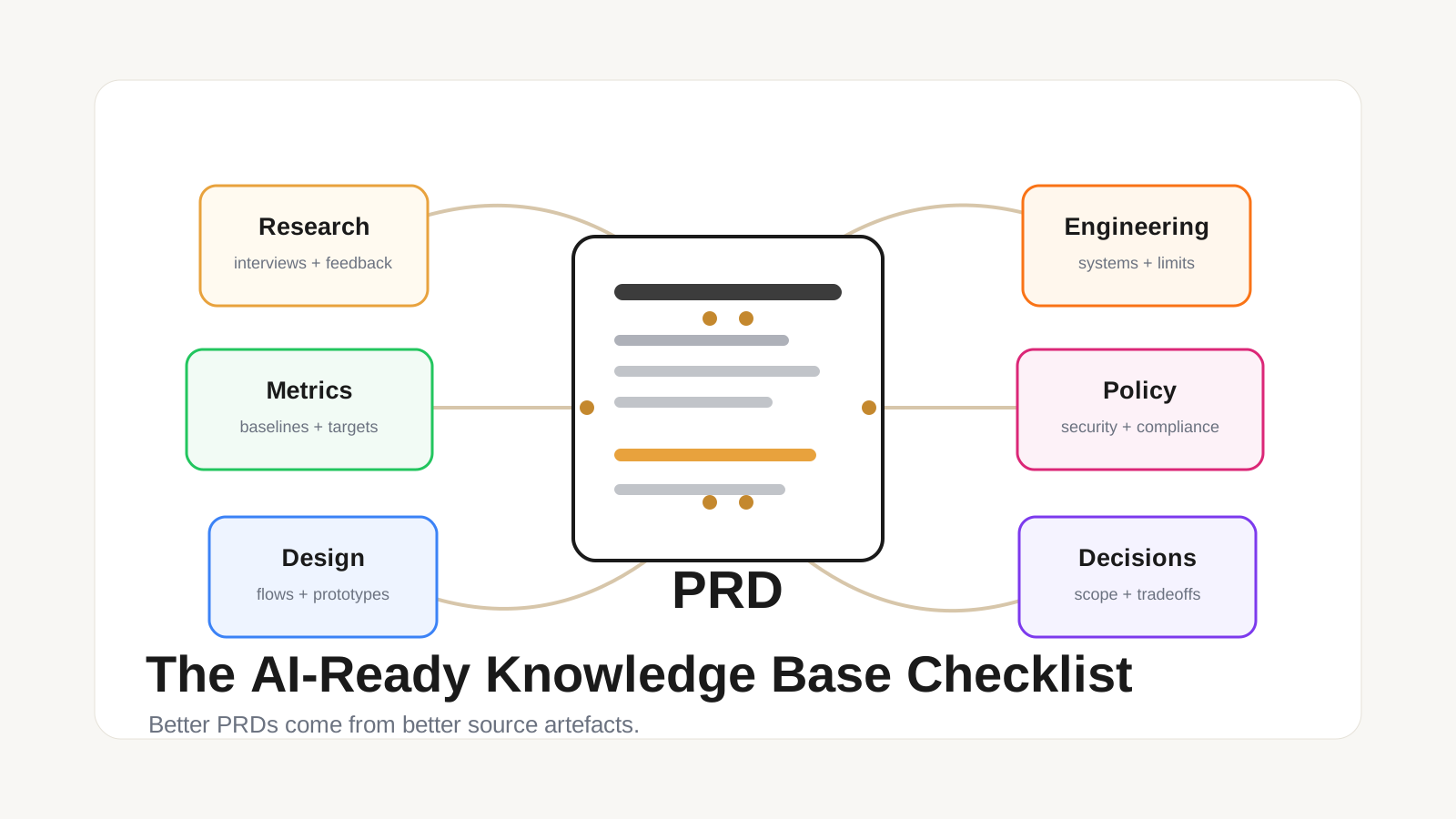
The common definition of a PRD is consistent across product templates: it explains what should be built, why it matters, who it is for, how it should behave, and how the team will know it worked.
Atlassian describes a PRD as a document that defines product purpose, features, functionality, behavior, user needs, and success criteria. Its guidance for effective PRDs emphasizes shared understanding, customer needs, goals, assumptions, user stories, design, and clear out-of-scope items.
Confluence's PRD template turns that into a working structure: team roles, target release, objectives, success metrics, assumptions, options, supporting documentation, open questions, and scope boundaries.
Miro's PRD template is similar. It lists overview, goals, success metrics, target audience, features and requirements, UX, assumptions and dependencies, out-of-scope items, owner, version history, and status.
The exact template does not matter as much as the job it performs. A good PRD should answer ten questions:
- What problem are we solving?
- Why does it matter now?
- Who is the user or customer?
- What exists today?
- What should change?
- What does success mean?
- What assumptions are we making?
- What constraints and dependencies apply?
- What is explicitly out of scope?
- What decisions, owners, and open questions remain?
If the knowledge base cannot answer those questions, the AI assistant will fill the gaps with generic product language.
AI-assisted PRDs need source artefacts behind every section
The practical standard is simple: every important PRD section should be traceable to source artefacts.
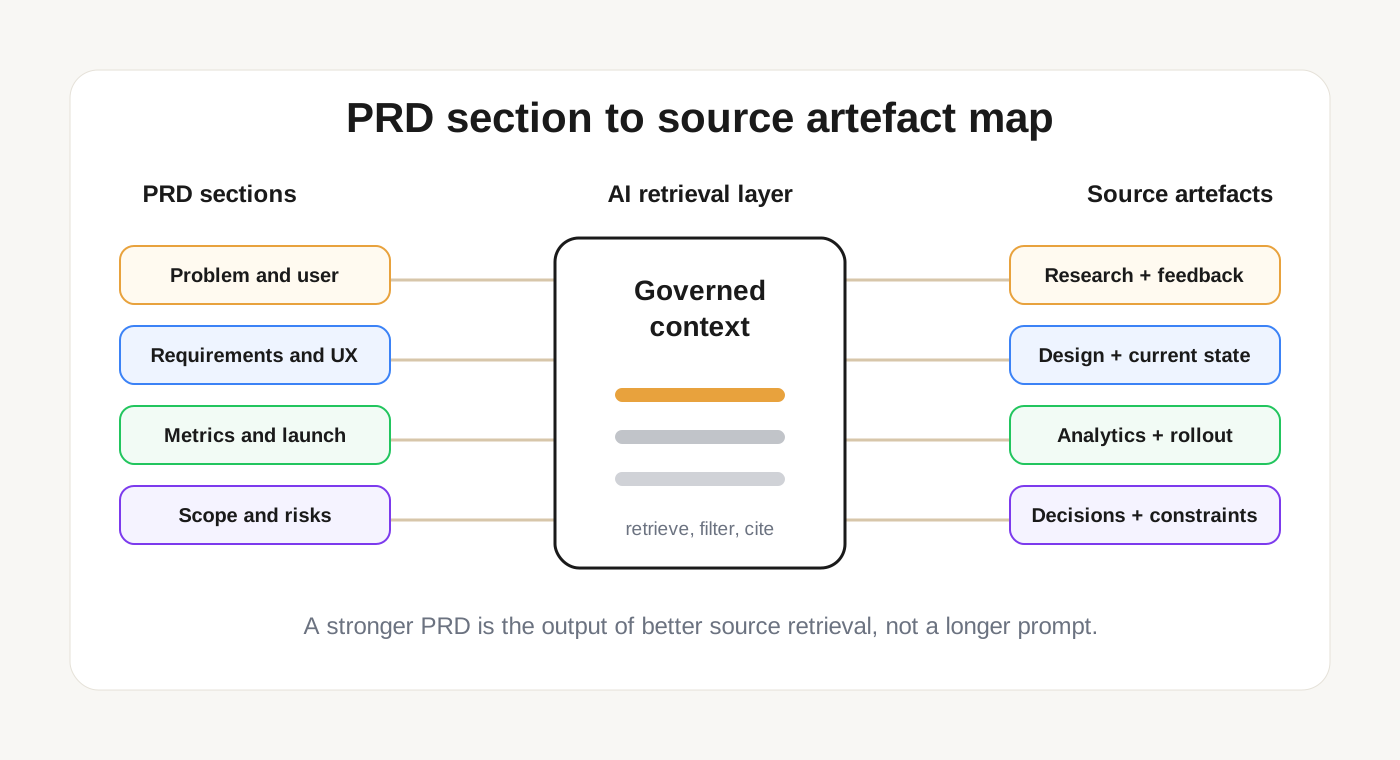
The AI should not merely write "increase activation" because that sounds plausible. It should retrieve the activation baseline, the funnel drop-off, the customer research, the related roadmap theme, and the prior decision that explains why this problem is worth solving now.
That changes the role of the knowledge base. It is not a folder of documents. It is the context layer that helps the AI produce a PRD with evidence, tradeoffs, constraints, and accountability.
The AI-ready PRD artefact checklist
Use this checklist to audit whether your knowledge base can support better PRD generation.
1. Product strategy and business goals
This artefact supports the PRD sections for objectives, strategic fit, priority, and why now.
Useful sources include:
- Company strategy memos
- Product strategy docs
- Annual or quarterly OKRs
- Roadmap themes
- Pricing or packaging strategy
- Executive decision notes
Without these sources, the AI can describe a feature but cannot explain why the feature deserves investment. A good PRD should connect the work to a business outcome: growth, retention, expansion, cost reduction, risk reduction, or customer trust.
For AI-assisted drafting, the strategy artefacts should be explicit about tradeoffs. "Improve onboarding" is too vague. "Reduce time to first successful workspace search for self-serve developers" gives the AI a sharper direction.
2. Customer research and user evidence
This artefact supports the problem statement, user needs, personas, use cases, and jobs to be done.
Useful sources include:
- Customer interview notes
- Discovery call transcripts
- User research summaries
- Persona documents
- Jobs-to-be-done notes
- Survey responses
- Sales call summaries
- Design partner feedback
The AI needs this evidence to avoid writing requirements around internal opinions. If the PRD says "users need faster setup," the source artefacts should show which users, what "setup" means, where they get stuck, and what language they use to describe the pain.
The highest-value research artefacts are not polished reports. They are specific observations: quotes, tasks, user segments, failed workflows, objections, and repeated patterns.
3. Existing product behavior
This artefact supports the current-state section, functional requirements, edge cases, and migration notes.
Useful sources include:
- Current product specs
- Existing PRDs
- Help docs
- API documentation
- UX flows
- Screenshots or walkthroughs
- QA notes
- Known limitations
- Release notes
AI-generated PRDs often fail here. They describe the desired future state without understanding the product that already exists. That creates duplicate features, broken assumptions, and requirements that ignore current behavior.
A useful knowledge base should help the AI answer: what happens today, where does the workflow start, what systems are touched, what data is created, what errors can occur, and what users have learned to expect?
4. Analytics, usage data, and baselines
This artefact supports success metrics, problem sizing, launch criteria, and post-launch evaluation.
Useful sources include:
- Product analytics dashboards
- Funnel reports
- Retention cohorts
- Activation metrics
- Search logs
- Feature adoption reports
- Experiment results
- Support volume trends
- Revenue or conversion data
The PRD should not only say what to build. It should define what success means before the team ships. That requires a baseline.
For an AI assistant, the best metric artefacts are plain-language metric definitions attached to real dashboards or exports. "Activation" should not be a floating word. It should have an event definition, a time window, a current value, and an owner.
5. Support tickets and customer feedback
This artefact supports pain evidence, prioritization, edge cases, and launch readiness.
Useful sources include:
- Support tickets
- Chat transcripts
- Customer success notes
- NPS verbatims
- Churn reasons
- Feature requests
- Bug reports
- Community discussions
Support artefacts are valuable because they show production reality. Research tells you what users say in discovery. Support tells you what breaks when users are trying to get work done.
For PRDs, the AI should be able to retrieve recurring complaints, affected segments, severity, frequency, and workarounds. A feature that removes a common support burden should read differently from a feature that explores a new opportunity.
6. Competitive and market context
This artefact supports positioning, differentiation, expected user mental models, and launch messaging.
Useful sources include:
- Competitive teardown notes
- Market research
- Win-loss analysis
- Analyst or category reports
- Public pricing pages
- Customer comparison notes
- Sales objection logs
Competitive context should not turn the PRD into a copycat brief. Its job is to help the team understand expectations and differentiation.
The AI should know whether a requirement is table stakes, a parity gap, a deliberate non-goal, or a place where the product should behave differently. That distinction prevents shallow "competitor X has it, so build it" reasoning.
7. Prior decisions and tradeoff records
This artefact supports assumptions, out-of-scope items, risks, and decision history.
Useful sources include:
- Decision records
- Prior PRDs
- Sprint planning notes
- Roadmap exclusion notes
- Architecture decision records
- Leadership review notes
- Postmortems
- Product review meeting notes
This is the most underrated category.
AI assistants are good at generating options. They are weaker when they cannot see which options the team has already rejected and why. Without decision history, the AI may recommend the same discarded approach every quarter.
A PRD knowledge base should preserve tradeoffs: what was chosen, what was rejected, who decided, what evidence was available, and what would cause the decision to change.
8. Design artefacts and UX principles
This artefact supports user experience, interaction requirements, accessibility, information architecture, and design constraints.
Useful sources include:
- Wireframes
- Figma links
- Journey maps
- Usability test notes
- Design principles
- Component guidelines
- Accessibility requirements
- Prototype feedback
- Content guidelines
The PRD does not need to duplicate the design file. It needs to explain the UX intent clearly enough for engineering, QA, and stakeholders to understand what matters.
For AI-assisted drafting, design artefacts help the assistant distinguish between behavior and presentation. The requirement is not "add a button." The requirement may be "let workspace admins create a scoped API key without leaving the document workflow."
9. Technical architecture and constraints
This artefact supports dependencies, feasibility, non-functional requirements, sequencing, and engineering risks.
Useful sources include:
- System architecture docs
- API specs
- Data model docs
- Event flow diagrams
- Service ownership docs
- Performance budgets
- Infrastructure constraints
- Security architecture
- Engineering RFCs
- Incident reports
PRDs fail when product intent ignores technical reality. The goal is not to make PMs write engineering specs. The goal is to let the PRD reflect known constraints before the team commits to a path.
An AI assistant should be able to retrieve constraints such as data ownership, latency expectations, API limits, tenant boundaries, migration requirements, or systems that cannot be touched in a release.
10. Legal, security, and compliance requirements
This artefact supports policy constraints, risk sections, permissions, data handling, and launch approval.
Useful sources include:
- Data retention policies
- Security reviews
- Compliance requirements
- Privacy impact assessments
- Contractual obligations
- Enterprise customer requirements
- Role and permission matrices
- Approved copy or policy language
In AI-assisted PRDs, this category matters because the assistant may generate a pleasant feature flow that violates a policy boundary.
The knowledge base should make constraints retrievable early: what data can be stored, who can access it, how long it can be retained, what audit trail is required, and which approvals are needed before launch.
11. Delivery plans, dependencies, and ownership
This artefact supports project status, release planning, team roles, dependencies, and sequencing.
Useful sources include:
- Roadmaps
- Sprint plans
- Jira epics
- Dependency trackers
- Team ownership maps
- Release calendars
- Launch checklists
- Cross-functional review notes
A good PRD is not only a description of intent. It helps teams coordinate execution.
The AI should know which teams own the affected systems, which roadmap commitments already exist, which dependencies can block the work, and what target release window is realistic. Without this context, the generated PRD may sound complete but be operationally naive.
12. Launch learnings and post-launch reviews
This artefact supports rollout strategy, success criteria, risk mitigation, and future iteration.
Useful sources include:
- Launch retrospectives
- Experiment readouts
- Incident reviews
- Adoption reports
- Sales enablement feedback
- Support readiness notes
- Customer rollout notes
- Post-launch metric reviews
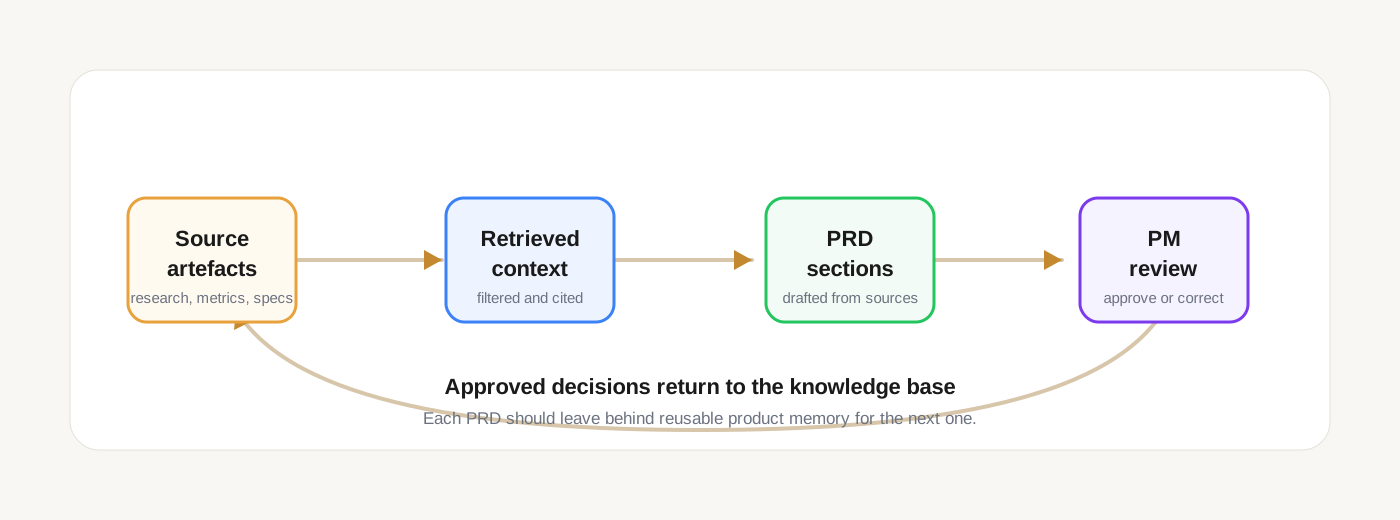
This is how the knowledge base gets better over time. Every shipped PRD should produce learning that helps the next PRD.
If a previous feature missed adoption targets, the AI should be able to retrieve the reason. If an enterprise rollout failed because permissions were unclear, the next PRD should not repeat that mistake.
Map PRD sections to artefacts before asking AI to draft
The easiest way to operationalize this is a source map. Before generating a PRD, identify which artefacts should support each section.
- Problem statement: customer interviews, support tickets, churn reasons, sales objections
- Objectives and strategic fit: product strategy, OKRs, roadmap themes, executive decision notes
- Target users and use cases: personas, jobs-to-be-done notes, research summaries, usage segments
- Current state: existing specs, help docs, UX flows, API docs, release notes
- Requirements: prior PRDs, current behavior docs, design artefacts, technical constraints
- Success metrics: analytics dashboards, metric definitions, baseline reports, experiment results
- Assumptions: discovery notes, risk logs, decision records, unanswered research questions
- Dependencies: architecture docs, ownership maps, delivery plans, third-party constraints
- Out of scope: tradeoff records, roadmap exclusions, prior rejected options
- Launch criteria: QA notes, rollout plans, support readiness docs, security approvals
- Open questions: product review notes, unresolved risks, stakeholder comments
This source map is also a useful prompt boundary. Instead of asking AI to "write a PRD for feature X," ask it to draft each section only from the approved artefacts connected to that section. If the sources are missing, the assistant should say what context is missing rather than inventing it.
The AI-ready PRD knowledge base test
Pick one PRD your team wrote recently. Then ask whether your knowledge base can answer these questions without relying on one person's memory:
- Which source proves the customer problem?
- Which strategy doc explains why this matters now?
- Which product docs show current behavior?
- Which metrics define the baseline and success target?
- Which design artefacts explain the intended user experience?
- Which technical notes define constraints and dependencies?
- Which legal, security, or compliance docs limit the solution space?
- Which decision record explains what is out of scope?
- Which launch review will teach the next PRD what happened?
If the answer is "we know, but it is in someone's head," the knowledge base is not ready for AI-assisted PRDs.
The knowledge base should make the PRD auditable
The deeper point is not document hygiene. It is traceability.
When a product manager uses AI to draft a PRD, the team should be able to inspect where the context came from: which customer notes, which metrics, which prior decisions, which technical constraints, which source versions, and which open questions shaped the output.
That is the same shift happening across AI knowledge bases. Human-facing knowledge bases helped people find information. AI-facing knowledge bases need to provide governed context that can be retrieved, checked, and audited. If you want the broader model, read What Is a Knowledge Base in the AI Agent World?.
For PRDs, the takeaway is direct: do not optimize first for prettier AI-generated documents. Optimize for better source artefacts.
What to do next
Run a 10-minute PRD source audit.
Take one recent PRD and draw a line from each major section to the artefacts that supported it. If a section has no source, mark it as unsupported. If the source exists but the AI cannot retrieve it, mark it as inaccessible. If the source is outdated or ambiguous, mark it as unsafe.
Then DM Flow on X with the weakest section: problem, metrics, current state, constraints, scope, or launch learning. If you are building AI-assisted product workflows, I will help you think through what your knowledge base needs to make those PRDs reliable.