The decision in front of operations leaders is not "should AI have memory?" Most AI systems now retain state across sessions by default. The decision is "what rules govern what the system keeps, what it discards, and what it must cite when it acts on something it has retained?" Without those rules, operational memory does not improve continuity — it compounds errors.
Operations teams are adding AI assistants to live workflows at pace: support agents query AI before responding to customers, finance teams ask for policy summaries, procurement managers check contract terms. In each flow, the system accumulates context. An AI assistant that remembers a customer's past complaint might carry an outdated status forward. One that recalls a procurement exception might apply it to a case where it no longer belongs. The memory is technically accurate. The retained state is operationally wrong.
The gap is not the AI. It is the absence of a memory policy — a simple set of rules that specifies what the system retains automatically, what requires human review or expiry, and what must be discarded after its purpose is served. This post is the next step in the operations series that began with Enterprise Search vs AI Search.
Key Takeaways
- AI memory in operations improves continuity, but only when it has explicit retention rules and review points — silence defaults accumulate the wrong state.
- There are three types of memory an AI system accumulates in live workflows: session context, accumulated workflow state, and retrieval patterns. Each has a different risk profile and a different policy requirement.
- The most common operational memory failure is not data loss — it is silent retention: the system keeps something that should have expired, changed, or triggered a human review.
- A memory policy for one workflow takes under an hour to draft and prevents the most common failure modes before they reach a customer or an audit.
What this post covers
After reading this, you will be able to draft a one-page memory policy for one operational workflow — specifying what the AI should retain, what it should discard, and what it must cite before acting on something it has remembered.
- What operational memory actually means — not the model definition, the architectural one
- Three types of memory that accumulate in AI workflows, and why each needs a different policy
- The failure modes when memory has no retention rules
- A framework for deciding what the system should remember, forget, and cite
- A memory policy template you can apply to one workflow today
For the broader context on how retrieval and context connect to operational reliability, see AI Context: The Missing Layer Between a Model and a Useful Answer.
Operational memory is not the same as model memory
The public conversation about AI memory usually centres on the model: does it retain facts between conversations? Can it recall what you said last week? That is a model capability question and largely out of your control as an operations leader.
The more important question for operations is architectural: does the system that wraps the model retain state that influences future answers? And if so, where is that state stored, who can inspect it, and how long does it persist?
In live workflows, operational memory accumulates in three distinct places.
Session context. Within a single interaction, the AI holds the full conversation thread — what the user asked, what documents were retrieved, what the system answered. When the session ends, this context is typically discarded. Most AI systems handle session memory correctly by default. This is the lowest-risk memory type.
Accumulated workflow state. Across sessions, some systems store summaries, flags, or derived facts: "this customer is on a payment plan," "this supplier is under review," "this exception was approved by the operations lead last quarter." This is the most useful form of operational memory — and the most dangerous if the underlying state changes and the stored summary is not updated.
Retrieval patterns. When the same query repeatedly returns the same document chunks, the risk is that those results begin to be surfaced preferentially — not because they are the best match for the current query, but because retrieval history has weighted them. This is not memory in the conventional sense, but it behaves like one. Stale chunks may receive preferential treatment simply because past queries surfaced them often.
Each type has a different failure mode and a different governance requirement.
The failure modes are specific, not abstract
Most operations leaders expect memory failure to look like data loss — the system forgets something it should have kept. The actual failure mode is the opposite: silent retention.
Stale accumulated state. A customer support workflow tags a customer as "escalation risk" based on three complaints over two months. The tag persists in the AI's workflow memory. Six months later, the customer has resolved every issue and become a referral source. The AI still routes their queries through a longer review queue, leads with caution-oriented responses. No one set an expiry for the tag. No one scheduled a review.
Expired exceptions. An operations manager approves a one-time pricing exception during a contract negotiation. The AI records it in workflow state. The contract closes. The exception should no longer apply. Six months later, a new representative handles a renewal for the same customer. The AI surfaces the old exception as prior approval. The rep applies it. Finance notices in the quarterly review.
Cross-session contamination. In multi-agent or multi-user environments, retained state from one session can inadvertently shape responses in another. If the AI summarises a prior interaction without clear attribution — "customer prefers email contact" — and the original source was a single conversation from 18 months ago, that retained summary may no longer reflect reality. Worse, different agents handling the same account may receive contradictory signals depending on which session's state the system draws from.
In each case, the failure is not that the system forgot something. It is that the system remembered something past its useful life, with no mechanism to question it.
What the system should remember, forget, and cite
The three-column framework below is the simplest useful structure for a memory policy. Apply it to one workflow in your operations to see where the gaps sit.
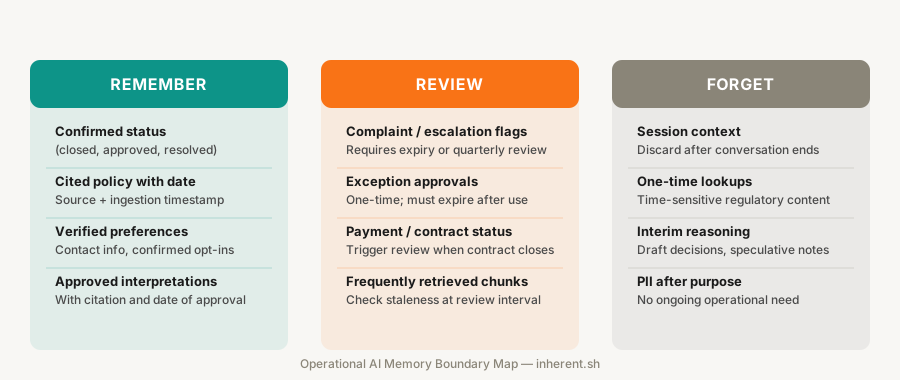
| Category |
Remember (retain without review) |
Review (retain with expiry or human check) |
Forget (discard after purpose) |
| Customer data |
Current contact info, stated preferences with date |
Complaint flags, escalation status, payment plan status |
One-time interaction details, session context after resolution |
| Decisions |
Approved policy interpretations (with citation and date) |
Exceptions approved by a human (with expiry trigger) |
Draft decisions, speculative summaries, interim reasoning |
| Workflow state |
Confirmed status — closed, approved, resolved |
Open flags, pending reviews, exception requests |
Interim states, session-only context |
| Retrieved documents |
High-confidence policy citations with source and date |
Frequently retrieved chunks that may be approaching staleness |
Single-use lookups, time-sensitive regulatory content |
The Review column is where most memory policy failures occur. If the system retains something in this category without a human checkpoint or expiry date, it silently upgrades from a working assumption to a fact. The intervention is mechanical: add an expiry date, a review trigger, or a staleness flag.
The Forget column is often left implicit. If you do not specify what should be discarded, the system's default is usually to retain. Explicit discard rules are the fastest way to prevent silent accumulation of operational state that has outlived its purpose.
How to draft a memory policy for one workflow
A memory policy does not need to be a formal compliance document. For a single workflow, a one-page policy with three sections is enough to prevent the most common failures.
Section 1 — What the system retains automatically. List the data types the AI can keep without review: confirmed statuses, cited policy references, verified contact preferences with a date. These are low-risk when the underlying data is kept fresh by a governed ingestion layer.
Section 2 — What requires review or expiry. List the data types that must carry an expiry date or a trigger for human review: exception approvals, escalation flags, unresolved complaint summaries, exception grants. Specify the review interval. Quarterly is usually sufficient for operational state; monthly for customer-facing workflows where situations change quickly.
Section 3 — What must not persist. List what must be discarded after the session or workflow step: session context, one-time lookups, interim calculation results, PII pulled for a specific decision that has no ongoing operational purpose. This section is as important as the first two — explicit discard rules are the only way to enforce boundaries in a system that defaults to retention.
Drafting these three sections for one workflow takes under an hour. The output becomes the governance layer that stops memory from accumulating silently in the background.
Why memory governance requires an auditable retrieval layer
Operational memory policy is only effective if you can inspect what the system retained and when. That requires the retrieval layer to be auditable — not just the memory store.
When retrieval is governed — documents re-indexed on change, chunks carrying source metadata and ingestion timestamps, each retrieved result producing a receipt — memory governance becomes tractable. You can ask "when was this retained?" and get a useful answer because the source event is traceable. You can ask "is this chunk still current?" because the ingestion date is surfaced alongside the content.
When retrieval is not governed, memory governance collapses into monitoring behaviour after the fact. Teams catch errors in customer escalations. They patch cases one by one. The policy exists on paper; the system does not enforce it in practice.
The architecture Inherent is built around — managed ingestion, auditable retrieval, source metadata on every chunk — is the foundation that makes operational memory policy enforceable rather than advisory. If your current retrieval layer cannot answer "when was this source last indexed?" then the memory policy you draft will be difficult to verify in production.
The next step
Pick one live workflow that uses an AI assistant or AI-powered search. Draft its memory policy using the three sections above: what the system retains automatically, what requires review or expiry, and what must not persist. The exercise takes 30-45 minutes.
The output is usually one of two things: a clean policy that confirms the system is already governed correctly, or a gap list — the specific places where memory is accumulating without rules, expiry dates, or review triggers.
Once you have the gap list, DM Flow on X @human_in_loop with what you found. What was the system remembering that it should not have been?
Tomorrow's post goes one layer deeper: Agent Memory Without Risk: A Plain-English Guide covers how AI agents accumulate memory across autonomous task sequences, and the boundary rules that keep agent memory safe in multi-step workflows.