Key takeaway: After you load model weights onto a GPU, whatever memory is left is a token budget, and the KV cache is what spends it. Every token in every active request holds a fixed number of bytes for as long as that request lives. Divide the leftover memory by the bytes per request and you get a hard number: how many users this GPU can serve at once. The decision this post helps you make: treat concurrency as arithmetic you can compute and change, instead of a capacity limit you discover in production.
Teams size inference hardware by the model. An 8B model in fp16 needs about 16 GB (15 GiB), an 80 GB card holds it comfortably, so the card looks like the right choice. Then real traffic arrives, requests queue behind each other, and the GPU that was supposedly two-thirds empty stops accepting work.
The missing term is the KV cache. It is per-request memory that decode cannot run without, and it grows with prompt length and with the number of simultaneous users. Most teams never budget for it. So the "so what": your concurrency ceiling is set by leftover memory divided by KV bytes per request, and both of those numbers are things you control.
Previous post: Prefill and Decode: Why One Model Has Two Bottlenecks, which ended on decode being limited by memory. This post is about what fills that memory.
What this post covers
After reading, you should be able to compute your own concurrency ceiling for a given model and context length, and name which lever to pull when the number is too low.
- What a KV cache is and why the attention mechanism cannot work without one
- The sizing formula, worked through two real model shapes
- Why the cache, not the weights, is what actually fills a GPU under load
- The four levers that move the ceiling, and what each one costs you
- Why retrieval precision belongs on that list of levers
What a KV cache is, and why attention cannot run without one
A transformer generates one token at a time. To produce token 500, the model attends over tokens 1 through 499: for each of those earlier positions it needs a key vector and a value vector, computed from that position's hidden state.
Those keys and values do not change once computed. Position 12's key is the same whether the model is writing token 13 or token 900. Recomputing all of them on every step would mean re-running attention over the entire sequence for every single output token, which turns generation into quadratic work.
So the engine stores them. The KV cache is that store: two tensors per attention layer, holding the keys and values for every token seen so far in this request. Each new token appends its own key and value and reads everything already there. Every serving engine makes that trade, spending bytes it has to hold for the life of the request to avoid FLOPs it would otherwise burn on every step. It is why decode is fast enough to ship, and everything else in this post follows from it.
Where it sits in the broader stack: the KV cache is the reason serving engines exist as separate software. PagedAttention and vLLM (SOSP 2023), continuous batching, prefix caching, and prefill/decode disaggregation are all different strategies for managing this one data structure. The vLLM authors' framing was that prior serving systems wasted 60% to 80% of their KV memory to fragmentation and over-reservation, and that recovering it was worth 2 to 4 times the throughput.
KV cache bytes for one request:
bytes = 2 × layers × kv_heads × head_dim × seq_len × bytes_per_element

  2               keys and values
  layers          transformer blocks
  kv_heads        distinct key/value heads (fewer than query heads under GQA)
  head_dim        dimension per head
  seq_len         prompt tokens + generated tokens, so far
  bytes_per_elem  2 for fp16/bf16, 1 for fp8
Two worked examples at fp16, using shapes published in The Llama 3 Herd of Models.
Llama 3.1 8B has 32 layers, 8 KV heads, and head dimension 128:
2 × 32 × 8 × 128 × 2 bytes = 131,072 bytes  →  128 KiB per token
8,192-token request                         →  1.0 GiB
Llama 3.1 70B has 80 layers, 8 KV heads, and head dimension 128:
2 × 80 × 8 × 128 × 2 bytes = 327,680 bytes  →  320 KiB per token
8,192-token request                         →  2.5 GiB
Two properties of that formula matter more than the absolute numbers.
- There is no batch term inside it. This is the cost of one request, and it is paid again in full for every concurrent request.
seq_len is the total sequence, not the answer. A 7,000-token prompt that returns a 200-token answer costs almost as much cache as a 7,000-token prompt that returns 1,000.
That second point surprises people. Reading a long prompt is a one-time cost; holding it is a cost you pay for every second the request stays alive.
Weights cost you once, the cache costs you per user
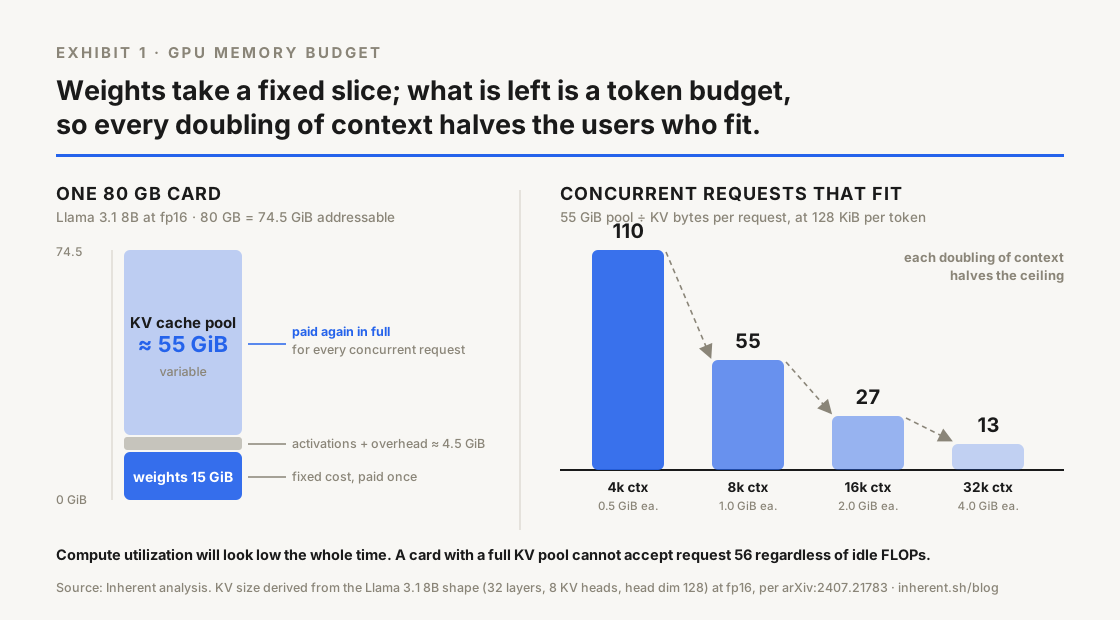
Put the two together on a single 80 GB card running Llama 3.1 8B at fp16. Everything below is in GiB, because an 80 GB card is 74.5 GiB of addressable memory:
 74.5 GiB   card
−15.0 GiB   weights (8.03B params × 2 bytes)
− 4.5 GiB   activations, workspace, engine overhead
──────────
≈55.0 GiB   available for KV cache

55 GiB ÷ 1.0 GiB per 8k request ≈ 55 concurrent requests
The 4.5 GiB overhead line is the one assumption in that block. It varies by engine and batch shape, so measure yours rather than inheriting mine.
That is the ceiling. Request 56 waits in the queue until one of the fifty-five finishes and releases its blocks. Every other term comes from the published model shape and your own context length, so you can compute this before you buy the hardware instead of after.
Three consequences follow directly:
- Doubling context halves concurrency. Moving from 8k to 16k prompts on the same card takes the ceiling from about 55 to about 27, because context length and user count draw from one pool.
- A bigger model is punished twice. Llama 3.1 70B needs more memory for weights and 2.5 times more cache per token, so the remaining budget is both smaller and consumed faster.
- Idle-looking GPUs are usually full. A card at 30% compute utilization with a full KV pool cannot take more work, and compute dashboards will not show you this. The ceiling normally gets discovered as a queue-depth alert.
The business-life example: one GPU, two support desks
A company runs one card for two internal assistants.
The sales desk asks short questions against short context. Roughly 2,000 tokens per request, so about 0.24 GiB of cache each. The 55 GiB pool holds around 225 of those at once.
The contracts desk pastes whole agreements. Roughly 30,000 tokens per request, about 3.7 GiB each. Fifteen of those consume the entire pool on their own.
One GPU, one model, and capacity swung by a factor of fifteen because of prompt length alone. Nobody changed a configuration file. When the contracts team ran a Monday batch, sales saw timeouts and filed a bug against the model. The model was fine. The two desks were competing for the same token budget, and nobody had written down what that budget was.
Four levers move the ceiling
| Lever |
What it changes |
Typical effect |
What it costs you |
| Attention shape (GQA, MQA, MLA) |
kv_heads in the formula |
Large, and it compounds with depth |
Fixed at training time. A model selection decision, not a serving knob |
| Paged allocation (PagedAttention) |
Waste, not the formula |
Reclaims memory lost to fragmentation and over-reservation |
Engine dependency, plus a block-size setting to tune |
| KV quantization (fp8) |
bytes_per_element, 2 down to 1 |
Roughly halves cache per token |
Small accuracy risk; validate on your own eval set |
| Shorter effective context |
seq_len |
Linear, and the easiest to move |
Requires knowing which context you can safely drop |
On the first row, the arithmetic is worth seeing. Grouped-query attention gives Llama 3.1 70B 8 KV heads instead of 64. Had it kept one KV head per query head, that 8,192-token request would hold 20 GiB of cache instead of 2.5 GiB, and a single request would not fit on most cards. Multi-query attention pushes further to one shared KV head, and DeepSeek-V2 compresses keys and values into a shared latent instead of storing them directly. Attention architecture is largely a KV-memory story now.
On the third row, fp8 KV cache is the highest-leverage change most teams have not tried. It is a serving-side flag, it does not touch the weights, and it buys back roughly half the pool.
Retrieval precision is a capacity lever
The fourth row is where most teams have the most headroom, and it is the one they can least see. Everything above it is a serving-layer concern, but seq_len gets decided upstream by whatever assembles the prompt. In a RAG system that is the retrieval layer.
Take the 8B card again, at 128 KiB per token against a 55 GiB pool:
- Retrieve 20 chunks of 500 tokens, plus system prompt and question. Call it 10,500 tokens, 1.28 GiB per request, and a ceiling near 43 concurrent users.
- Retrieve 5 chunks that are actually relevant. Call it 3,000 tokens, 0.37 GiB per request, and a ceiling near 150.
Same GPU, same model, roughly 3.5 times the concurrency, from retrieval quality alone. Padding the context window with marginal chunks is a hedge against a weak retriever, and you pay for that hedge in GPU capacity and in time to first token.
This is the part of Inherent's argument that shows up on the infrastructure bill. Managed ingestion and deterministic retrieval exist so the context you send is the context you need: chunked with structure preserved, and ranked the same way every time. Nobody buys a context engine to save GPU memory, but the saving lands in the same budget as the hardware.
Worth separating two claims that sound alike: reproducible retrieval buys you capacity here, and it is also the only thing that buys you consistent answers, which is a job KV and prefix caching cannot do no matter how large you make the cache.
The bottom line, and where to start
Concurrency is leftover memory divided by KV bytes per request. Both terms are yours to set, so the number is something you choose.
A ten-minute audit, today:
- Compute your per-token KV size from the formula and your model's layer count, KV head count, and head dimension.
- Multiply by your actual p95 prompt length. Your configured maximum will flatter you; the two are usually far apart.
- Subtract weights and overhead from GPU memory, divide, and write the number down. That is your ceiling.
- Compare it against your peak concurrent sessions. If the gap is under 2x, you are one traffic spike from queueing.
- If it is tight, check the cheap levers before the expensive one: fp8 KV cache and a shorter retrieved context both land this week. A second GPU does not.
If step 5 points at your retrieved context, the fastest way to see how few chunks you actually need is to run the same questions against a retriever that returns the same ranking every time. The Inherent Public API does that part for you: get started in the docs.
Then send me the number. I want to know how many of you are running with less headroom than you thought, and which lever moved it most. DM me on X with the ceiling you computed and the p95 prompt length behind it.
Next read: Tensor vs Pipeline Parallelism: Splitting Models Across GPUs, what happens once the model itself, not just the KV cache, doesn't fit on one GPU.